
Securing sensitive data requires more than just a firewall; it demands precision access control deep within the database itself. Understanding the technical differences in Row-level and Column-level Security - Oracle vs PostgreSQL is required for building a secure data environment during database migrations. While Oracle relies on Virtual Private Database (VPD) for fine-grained control, the native PostgreSQL Row & Column level Security features offer a streamlined, declarative alternative. By leveraging these PostgreSQL Row & Column level Security capabilities, administrators can implement a defense-in-depth model that protects specific records and fields without relying on complex, proprietary code.
This granular capablity allows architects to embed security logic directly into the data layer, ensuring that policies persist whether the data is accessed via a REST API, a BI tool, or a command-line client. Shifting from procedural models in Oracle (we will discuss this shortly) to PostgreSQL's native policies not only simplifies compliance but also enhances auditability. For a broader context on why these access controls are vital for preventing data breaches, the OWASP Top Ten consistently lists broken access control as one of the most severe web application security risks.
Before diving deep into PostgreSQL, it is important to acknowledge the landscape Oracle professionals are navigating. Oracle handles granular security through a sophisticated, tiered suite of tools. The classic approach relies on Oracle Label Security (OLS) and Virtual Private Database (VPD), but modern implementations also leverage Real Application Security (RAS) which integrates security at the application session level.
In the Oracle ecosystem, security is frequently procedural. Administrators use packages like DBMS_RLS to bind policy functions to tables; when a user queries data, these functions execute in the background to dynamically rewrite the SQL with an appended WHERE clause. While powerful, this can be opaque; debugging why a row is invisible often requires tracing PL/SQL logic hidden in package bodies. On the other hand, Oracle Label Security is a specialized form of row-level security which uses sensitivity labels (e.g., Public, Confidential, Top Secret). Each row is assigned a label, and each user is granted a label range or clearance. For column-level protection, Oracle users typically choose between Data Redaction for on-the-fly masking at the presentation layer or Database Vault to enforce 'realms' that block even privileged DBAs from viewing sensitive fields. While this 'defense-in-depth' suite is robust, it often carries a heavy burden of configuration complexity and licensing costs that PostgreSQL users aim to simplify.
A quick Architecture Audit can save hours of troubleshooting later.
Try it Now!Let HexaRocket simplify it - migrate smarter, faster, and stress-free.
Contact us Today!HexaRocket performs end-to-end database migrations and replication seamlessly between Oracle, SQL Server, MySQL, MariaDB, and PostgreSQL.
Try Today!In Oracle, RLS is typically implemented via Virtual Private Database (VPD). It is procedural, meaning you must write a PL/SQL function that returns a WHERE clause string, which the database then appends to incoming queries.
To implement VPD, the administrative user (e.g., SALES_ADMIN) must have specific privileges granted by a SYSDBA.
GRANT EXECUTE ON DBMS_RLS TO SALES_ADMIN;
GRANT CREATE ANY PROCEDURE TO SALES_ADMIN;
GRANT CREATE SESSION TO alice, bob;
Create a table and populate it with records for multiple users.
-- Logged in as SALES_ADMIN
CREATE TABLE sales_data (
    id          NUMBER,
    region      VARCHAR2(20),
    amount      NUMBER,
    sales_rep   VARCHAR2(20) -- This column identifies the owner
);

INSERT INTO sales_data VALUES (1, 'East', 5000, 'ALICE');
INSERT INTO sales_data VALUES (2, 'West', 6000, 'BOB');
INSERT INTO sales_data VALUES (3, 'North', 7000, 'ALICE');
INSERT INTO sales_data VALUES (4, 'South', 4500, 'BOB');
COMMIT;

-- Grant read access to the users
GRANT SELECT ON sales_data TO alice, bob;
The policy function is a standard PL/SQL function that returns a VARCHAR2 string. This string will be appended to any query against the table.
Logic: SYS_CONTEXT('USERENV', 'SESSION_USER') captures the name of the user currently logged in.
CREATE OR REPLACE FUNCTION get_user_orders(
  schema_p IN VARCHAR2,
  table_p  IN VARCHAR2
) RETURN VARCHAR2 AS
BEGIN
  -- Returns: sales_rep = 'ALICE' (or whoever is logged in)
  RETURN 'sales_rep = SYS_CONTEXT(''USERENV'', ''SESSION_USER'')';
END;
/
BEGIN
  DBMS_RLS.ADD_POLICY (
    object_schema    => 'SALES_ADMIN',
    object_name      => 'sales_data',
    policy_name      => 'sales_rep_policy',
    function_schema  => 'SALES_ADMIN',
    policy_function  => 'get_user_orders',
    statement_types  => 'SELECT, INSERT, UPDATE',
    update_check    => TRUE
  );
END;
/
To verify, you must connect as the specific users.
-- Connect as Alice
CONNECT alice/password
SELECT * FROM SALES_ADMIN.sales_data;
-- Output:
        ID REGION                   AMOUNT SALES_REP
---------- -------------------- ---------- --------------------
         1 East                       5000 ALICE
         3 North                      7000 ALICE
-- Connect as Bob
CONNECT bob/password
SELECT * FROM SALES_ADMIN.sales_data;
-- Output:
        ID REGION                   AMOUNT SALES_REP
---------- -------------------- ---------- --------------------
         2 West                       6000 BOB
         4 South                      4500 BOB
Note: Highly flexible but "slightly complicated". You cannot see the security logic by looking at the table definition; you must hunt down the PL/SQL package.
PostgreSQL (since version 9.5) has adopted a standard-compliant, declarative approach to RLS. Unlike Oracle's reliance on packages, in PostgreSQL Row & Column level Security features are implemented as native SQL command objects attached directly to the table.
In PostgreSQL, RLS is "opt-in." By default, tables are open to anyone with SELECT privileges. To begin securing a table, you must enable the feature explicitly. This is done using the standard ALTER TABLE command.
-- Step 1: Create a sample table and insert few records
CREATE TABLE sales_data (
    id SERIAL PRIMARY KEY,
    region VARCHAR(50),
    amount NUMERIC,
    sales_rep VARCHAR(50)
);
INSERT INTO sales_data (region, amount, sales_rep) VALUES
('East', 5000, 'alice'),
('West', 6000, 'bob'),
('North', 7000, 'alice'),
('South', 4500, 'bob');

-- Step 2: Enable RLS explicitly
ALTER TABLE sales_data ENABLE ROW LEVEL SECURITY;

-- Step 3: Create database roles for testing
CREATE ROLE alice LOGIN;
CREATE ROLE bob LOGIN;
GRANT SELECT, INSERT, UPDATE ON sales_data TO alice, bob;
Once enabled, if you do not define a policy, no one (except the table owner and superusers) can see any rows. This "fail-safe" default is a distinct advantage of the PostgreSQL Row level Security architecture.
USING and WITH CHECK Clauses for defining Policies.The power of Postgres RLS lies in the distinction between reading existing data and modifying data. This is controlled via USING (for visibility) and WITH CHECK (for data integrity).
Let’s have a policy so that the role should only see data where the sales_rep matches their username.
-- Create the Policy
CREATE POLICY rep_isolation_policy ON sales_data
    FOR ALL                        -- Applies to SELECT, INSERT, UPDATE, DELETE
    TO public
    USING (sales_rep = current_user)
    WITH CHECK (sales_rep = current_user);
WITH CHECK critical?If you only define the USING clause, a user could theoretically insert a row intended for another sales rep (e.g., sales_rep = 'admin'). The insert would succeed, but the user would immediately be unable to see the row they just created. The WITH CHECK clause prevents this logical inconsistency, ensuring users can only create data they are allowed to view.
Now, let's see how the data presents itself differently depending on who is logged in.
Scenario A: Logged in as 'Alice'
SET ROLE alice;
SELECT * FROM sales_data;

-- Output
id | region | amount | sales_rep
----+--------+--------+-----------
  1 | East   |   5000 | alice
  3 | North  |   7000 | alice
(2 rows)
Note: Alice cannot see Bob's records (West and South). They simply do not exist in her view.
Scenario B: Logged in as 'Bob'
SET ROLE bob;
SELECT * FROM sales_data;

--Output
id | region | amount | sales_rep
----+--------+--------+-----------
  2 | West   |   6000 | bob
  4 | South  |   4500 | bob
(2 rows)
For more technical syntax details, refer to the Official PostgreSQL Documentation on Row Security.
In modern web applications, you rarely create a distinct database role (like sales_user) for every single human user. Instead, the application connects as a generic app_user and handles authentication internally.
How do you enforce RLS in this scenario? You use PostgreSQL Session Variables. This is a superior method for SaaS platforms migrating from Oracle.
-- Drop the previously created policy
SET ROLE TO postgres;
DROP POLICY rep_isolation_policy ON sales_data ;

-- Create a policy that looks at a custom session variable
CREATE POLICY tenant_isolation ON sales_data
    FOR ALL
    TO PUBLIC
    USING (sales_rep = current_setting('app.username', true));

-- 2. Simulate the Application logic
BEGIN;
    -- The application sets the variable when the user logs in
    SET LOCAL app.username = 'alice';

    -- Now, this query only returns rows for North-East
    SELECT * FROM sales_data;
    -- Output
    id | region | amount | sales_rep
    ----+--------+--------+-----------
      1 | East   |   5000 | alice
      3 | North  |   7000 | alice
    (2 rows)
COMMIT;
A few facts to note about policies while enabling Row Level Security.
While RLS filters rows horizontally, CLS filters data vertically. Achieving true PostgreSQL Security requires handling sensitive fields like Social Security Numbers, Salaries or Sales numbers.
GRANT ApproachPostgreSQL allows you to grant privileges on specific columns. This is the most secure method as it is enforced at the kernel level.
CREATE TABLE employees (
    id INT,
    name TEXT,
    department TEXT,
    salary NUMERIC, -- Sensitive Column
    ssn TEXT        -- Sensitive Column
);

INSERT INTO employees VALUES (1, 'John Doe', 'Engineering', 90000, '123-45-6789');

CREATE ROLE intern;
-- Grant access ONLY to non-sensitive columns
GRANT SELECT (id, name, department) ON employees TO intern;
If the intern tries to read everything, PostgreSQL throws a hard error.
SET ROLE intern;
SELECT * FROM employees;
-- Output
ERROR:  permission denied for table sales_data
However, if they request only the allowed columns, it succeeds:
SELECT id, name, department FROM employees;
-- Output
 id |   name   | department
----+----------+-------------
  1 | John Doe | Engineering
(1 row)
To emulate Oracle’s seamless column hiding (where SELECT * simply returns nulls or omits columns without error), the standard PostgreSQL practice is using Views.
-- Create a secure view that strictly excludes sensitive columns
CREATE VIEW public_employees AS
SELECT id, name, department
FROM employees; -- Excludes 'salary' column

GRANT SELECT ON public_employees TO intern;
If you need Oracle-style redaction (e.g., showing "XXX-XX-1234"), you can use PostgreSQL's CASE logic inside a View, or utilize the pg_anonymize extension if your environment supports it.
CREATE ROLE hr_manager;

CREATE VIEW safe_employees AS
SELECT
    id,
    name,
    department,
    CASE
        WHEN current_user = 'hr_manager'
            THEN ssn                           -- Full SSN for HR manager
        ELSE 'XXX-XX-' || right(ssn, 4)        -- Masked SSN for everyone else
    END AS ssn_masked
FROM employees;

GRANT SELECT ON safe_employees TO hr_manager;
GRANT SELECT ON safe_employees TO intern;
As intern : Intern sees only the last 4 digits.
SET ROLE intern;
SELECT * FROM safe_employees;
-- Output
 id |   name   | department  | ssn_masked
----+----------+-------------+-------------
  1 | John Doe | Engineering | XXX-XX-6789
(1 row)
As hr_manager :
SET ROLE hr_manager;
SELECT * FROM safe_employees;
-- Output
 id |   name   | department  | ssn_masked
----+----------+-------------+-------------
  1 | John Doe | Engineering | 123-45-6789
(1 row)
PostgreSQL Anonymizer is an extension to mask or replace commercially sensitive data from a Postgres database. For a robust, enterprise-grade solution, we recommend the PostgreSQL Anonymizer extension. It acts as a transparent layer that dynamically masks data based on security labels, offering a direct functional equivalent to Oracle's redaction capabilities without altering the underlying data.
Having stepped through the granular configurations of RLS policies and column grants, it is valuable to visualize how these components interact within the PostgreSQL engine. When a user submits a query, it doesn't just hit the storage layer directly; it passes through a sophisticated enforcement pipeline. The diagram below illustrates this journey, showing how the database evaluates row visibility rules first, followed by column-level privilege checks, ensuring that the final result set is strictly compliant with your security architecture before it ever reaches the application.
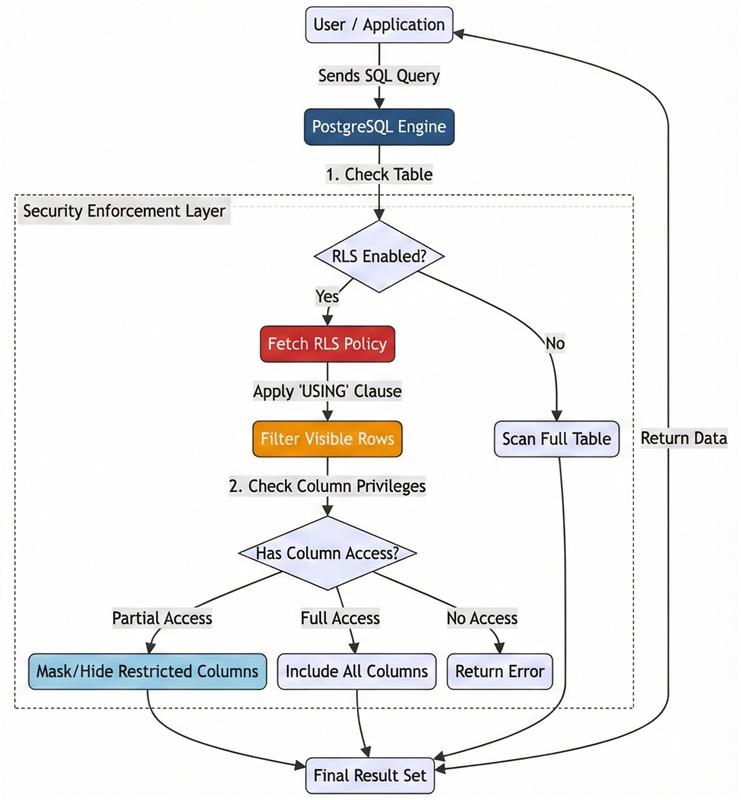
To ensure your database setup meets industry benchmarks, we recommend consulting the CIS PostgreSQL Benchmark. To validate your security implementation and ensure your database setup meets industry benchmarks, we recommend using pgdsat, an open-source tool designed to perform a comprehensive security assessment report for your PostgreSQL cluster.
Migrating security models is often the most complex part of a database transformation. However, the PostgreSQL Security capabilities offer a modern, highly readable, and maintainable alternative to Oracle's VPD. By utilizing CREATE POLICY for row filtering and specific GRANT statements or Views for column protection, you can build a system that is secure by design.
If you need expert support migrating legacy or complex Oracle, SQL Server, MySQL, or MariaDB databases to PostgreSQL or distributed databases, we’re here to help.
HexaCluster provides end-to-end migration and modernization services, including application migration and modernization, database migration, and PostgreSQL consulting such as performance tuning, health audits, managed DBA services, and 24/7/365 support.
To start a conversation or explore how we can support your migration journey, please contact us at connect@hexacluster.ai
Subscribe to our Newsletters and Stay tuned for more interesting topics.

Goutham is a Senior Database Developer and Administrator, who graduated from one of the reputed universities like IIIT. He is passionate about Open Source and building solutions for Highly Available and Scalable PostgreSQL clusters. Goutham has supported several Customers in deploying PostgreSQL efficiently and migrating from Oracle, SQL Server and MongoDB to PostgreSQL.
Start your migration journey 🚀
start your migration journey with our expert team
Database & Application Migration Assessment Tool
End-to-End Database Migration & Modernization Tool
Database Code Object Conversion to PostgreSQL
MyBatis Mapper Conversion to PostgreSQL
Enterprise Data Replication & Live CDC
Oracle Compatibility Layer for PostgreSQL